
AI Tools Blog
Runway Ads: How the AI Ad Agent Works and What It Costs


Runway Ads is an AI agent that plugs into your Meta, Google and TikTok ad accounts, studies the ads that are already earning spend, generates on-brand variants and publishes the versions your team approves. Runway first announced it on September 30, 2026 and opened it to every paid plan on October 27. Rather than restate the launch post, this article focuses on the questions a small performance team should ask before switching it on: what the setup involves, which plan is enough, where your credits go, and how much weight to give the results Runway reports from its own campaigns.
- Runway Ads has been included in the Standard, Pro and Max plans since October 27, 2026; the Free plan card does not list it.
- Meta, Google and TikTok are the only ad platforms you can connect today; Runway says more are coming in the next few weeks.
- Every variant passes an automated brand check and waits in an approval queue; nothing goes live until someone on your team approves it.
- It runs on your existing Runway credits, but Runway has not published how many credits a variant or video consumes.
- The headline results, roughly 10x weekly ad volume and 41% lower cost per subscriber, come from Runway's own marketing team, not an independent test.
What the agent actually does
Runway’s product page describes the tool as an agent that runs the creative side of a paid ad program. It builds video and image ads from your brand kit, product imagery and past winners, then tags each variant by hook, audience, format and call to action. Approved variants are published to the connected ad account, performance is read back from the same platforms, and the next round of creative is shaped by what earned spend.
According to the October 27 general availability post, performance is measured against a goal you set for the workspace: subscriptions, purchases, leads, app installs or brand awareness. The tool flags your strongest and weakest ads against that goal. When you ask for variants, the agent breaks an ad down, isolates one variable to test and returns several on-brand versions in a single session. If you have run disciplined creative tests by hand, the logic will feel familiar; the difference is the speed.
Each variant is also resized and reformatted for the aspect ratios and specs of each channel, so an ad that works on TikTok can be turned into versions formatted for Meta or Google without starting over.
Setting it up, step by step
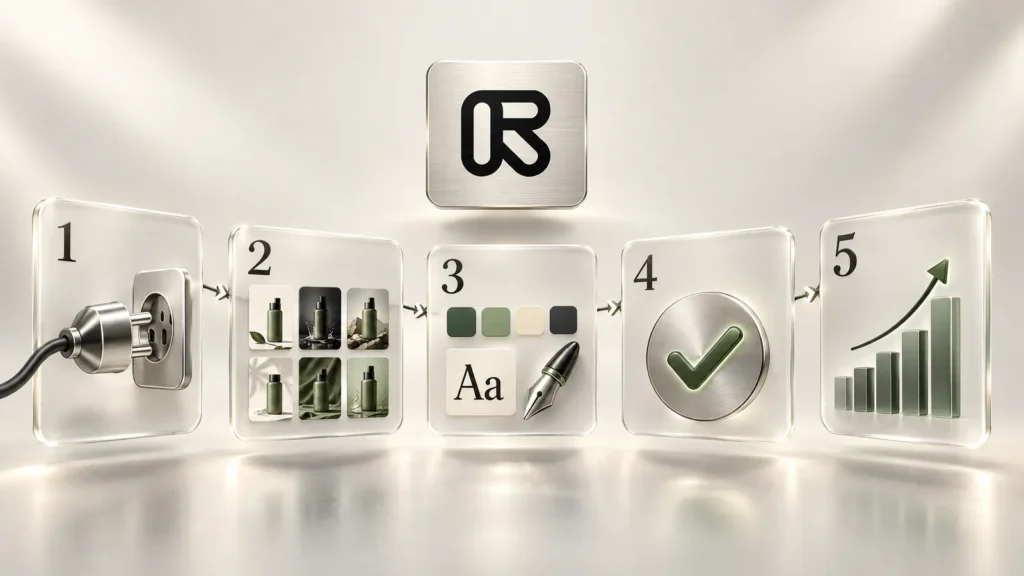
You open the tool from the sidebar in the Runway app or from the Try Runway Ads button on the product page. The launch post outlines six steps:
- Connect your ad accounts. Link Meta, Google and TikTok to one dashboard and pick the workspace goal.
- Choose a starting point. Upload a strong ad, pull one from a connected account, or begin from a template or a written brief.
- Confirm the brand kit. Runway drafts a kit from your website or uploaded guidelines. Your logos, colors, fonts and voice are applied to every variant, so review the draft carefully instead of clicking through.
- Generate variants. The agent produces versions around the variable it chose to test.
- Approve and publish. A team member must approve each ad. Approved ads go to your connected accounts, and you can start or pause them from inside Runway.
- Adapt across platforms. Ask for versions of a proven ad formatted for the other networks.
On Enterprise accounts, an admin first enables the tool in Organization Settings and then turns it on per workspace. Free workspaces need to move to a paid plan to get access.
Guardrails: approvals, brand checks and budget limits
What the agent will not do on its own matters as much as what it will. Runway’s September 30 introduction says every variant goes through an automated brand check before it reaches the approval queue, and human approval is on by default. Teams can switch to automated publishing by campaign or by variant type once they trust the output. Our advice is to leave that switch off for the first few weeks: a small mistake in the drafted brand kit spreads to dozens of ads very quickly when nobody reviews them.
The same post says the agent respects budget limits you set, such as a maximum daily change, a minimum share of net-new audience and caps on retargeting. Configure these before the first campaign. Limiting what the agent can touch is easier than auditing what it already changed.
Localization
The agent localizes on-screen text, product screenshots and voiceover, following rules your team defines for brand voice and terms that should never be translated. Performance is reported per market, because a hook that wins in one country can fail in another. Runway’s public pages do not list the supported languages, so if you run campaigns in several markets, have a native speaker read the first batch line by line. Product names, prices and offer terms are where machine adaptation slips most often.
Runway Ads pricing: which plan, how many credits?
We checked Runway’s pricing page on November 3, 2026:
| Plan | Monthly billing | Annual billing (per month) | Credits per month | Runway Ads |
|---|---|---|---|---|
| Free | $0 | $0 | 125 (one-time) | Not listed |
| Standard | $15 | $12 | 625 | Included |
| Pro | $35 | $28 | 2,250 | Included |
| Max | $95 | $76 | 9,500 | Included |
One inconsistency is worth knowing about. The October 27 changelog entry carries an “All Plans” tag, while its text says Ads is included with every paid plan, and the pricing cards list it only under Standard, Pro and Max. Taking the more specific wording, the Free plan does not include it.
The bigger gap is credit consumption. The product page says the tool runs on the credits you already have, but neither it nor the launch posts state how many credits a variant, an image or a video costs. Video generation is the fastest way to burn Runway credits, so a video-heavy test round could exhaust Standard’s 625 monthly credits sooner than you expect. Measure it yourself: generate a handful of variants from one ad and note how far your balance drops. Also keep the two budgets apart in your head. Runway credits pay for creative generation only; the media spend on Meta, Google or TikTok still comes out of your ad accounts.
Runway Ads vs. Create Ad
Runway also has a separate tool called Create Ad. Per Runway’s help center, Create Ad makes a single ad from a product image and a prompt, with no account connection. Runway Ads connects to your ad accounts, builds from what is already performing and adds a review step before anything goes out. Create Ad suits a quick one-off; Runway Ads is designed for ongoing paid campaigns.
How to read Runway’s own numbers
Runway says it has used the agent on its own ads since July. The figures on the product page and in the September 30 post: weekly ad volume rose from 77 to about 900, return on ad spend doubled, conversion rose roughly 34%, click-through rate held steady, and cost per subscriber fell 41% despite higher total spend. The October 27 post rounds the volume figure to “from under 100 to roughly 1,000.” Adweek reports that Runway used the agent on campaigns that helped drive more than $100 million in annual recurring revenue.
Those numbers are worth taking seriously, with two caveats. They come from Runway’s own team, and no independent test has been published. And Runway is a creative-tools company advertising its own product, with in-house expertise most advertisers do not have. For a small store shipping five ads a week, the real question is less about volume and more about whether the agent picks the right variable to test.
Who should try it now, and who should wait
- Teams with steady spend on Meta, Google and TikTok stand to gain the most. If hand-building hook and format variations is a bottleneck, the agent speeds that up while the approval queue keeps you in control.
- Agencies may find the per-workspace setup and brand kits a natural way to keep clients separate. Verify each client’s brand kit on its own before the first publish.
- Advertisers on other networks will have to wait. Runway says more platforms are coming in the coming weeks but has not named them or given dates.
- Brands without paid campaigns yet get little from the performance loop. Runway’s regular image and video tools are the more sensible starting point.
Finally, accountability stays with you. Approved ads are published from your accounts, so platform rules, including requirements to disclose AI-generated content, remain the advertiser’s responsibility.
Frequently asked questions
Is Runway Ads available on the Free plan?
Based on Runway's wording, no. The October 27, 2026 announcement says Runway Ads is included with every paid plan, and the pricing page lists it only under Standard, Pro and Max. A changelog tag reading "All Plans" contradicts that, but Free workspaces are told to upgrade for access (checked November 3, 2026).
Which ad platforms does Runway Ads support?
Meta, Google and TikTok. Runway says it will connect more platforms in the coming weeks but has not said which ones or when.
How many credits does Runway Ads use?
Runway says the tool uses the credits already on your plan but has not published a per-variant or per-video cost. Run a small test and watch your balance. Media spend on the ad platforms is separate from Runway credits.
Can Runway Ads publish ads without my approval?
Not by default. Each variant goes through an automated brand check and then waits for a team member to approve it. Runway says teams can opt into automated publishing by campaign or variant type once they are comfortable.
Does Runway Ads translate ads into other languages?
Yes. It localizes on-screen text, product screenshots and voiceover using rules your team sets, and reports performance per market. Runway does not publish a list of supported languages, so review localized variants before they go live.
What is the difference between Runway Ads and Create Ad?
Create Ad generates a single ad from a product image and a prompt without connecting an ad account. Runway Ads connects to Meta, Google and TikTok, builds variants from ads that are already performing, publishes after approval and reads results back.
Sources
- Runway Ads: Generally Available — Runway, 3 November 2026
- Introducing Runway Ads — Runway, 3 November 2026
- Runway Ads — Runway, 3 November 2026
- Plans and Pricing — Runway, 3 November 2026
- Product Updates & Changelog — Runway, 3 November 2026
- Create Ad — Runway Help Center, 3 November 2026
- Runway's AI Video Agent Creates and Measures Ads Across Platforms — Adweek, 3 November 2026
- Runway Ads is listed on Standard, Pro and Max, with Free access unconfirmed — OpenTools, 3 November 2026