

AI Tools Blog
Import to Lovable: Moving Apps from Bolt, Replit and v0


You can now import to Lovable an app you started somewhere else: since October 29, 2026, Lovable accepts a ZIP export from Replit, Bolt, v0, Base44 or Manus and rebuilds it as a Lovable project. The import button is the easy part. This guide covers the parts that decide whether a migration goes smoothly: what the ZIP should and should not contain, how your database rows and user accounts move, what your users will notice, and how to avoid wasting the single free import.
- Replit, Bolt, v0, Base44 and Manus have guided export steps; any other code, including a downloaded GitHub repository, can be uploaded as a ZIP of up to 250 MB.
- Lovable rebuilds the app on TanStack Start and moves the schema and users to its built-in backend.
- Database rows, uploaded files, passwords and active sessions are not in the ZIP; users set a new password on their next sign-in.
- Each account and workspace gets one free import, counted as used once the project is created, even if the import fails.
- Memory (October 30) and Dreaming (November 4) help a migrated project keep its rules across conversations.
What Lovable’s import feature does
Lovable builds web apps from a chat. Until late October there was no supported way to bring in a project that lived in another builder; you either pasted code by hand or described the app again from scratch. The October 29, 2026 changelog added Import project to Lovable to the + menu in the dashboard prompt box. It covers two cases:
- Project import: upload a ZIP of the code from Replit, Bolt, Base44, v0 or Manus. Code from anywhere else, including a repository downloaded from GitHub as a ZIP, goes through Upload code.
- Website import: enter the address of a public site, for example one built on Wix, Squarespace, Webflow or Framer, and Lovable recreates what visitors see as an editable project.
This guide focuses on project import, because an app with a database and signed-in users needs far more planning than copying a marketing site.
What carries over and what does not
According to Lovable’s documentation, the importer inspects the code without running it, rebuilds the app on TanStack Start (the same stack new Lovable apps use) and swaps the old sign-in for Lovable authentication. Here is the breakdown, based on the documentation as checked on November 12, 2026:
| Component | What happens | Your job |
|---|---|---|
| Code, pages, routes | Rebuilt with the same pages and behavior | Provide a clean ZIP under 250 MB |
| Database schema | Tables recreated in the built-in backend | Upload rows per table as CSV or JSON |
| Users | New account per user, linked to the original user ID; roles and memberships kept | Export the users table with emails and original IDs |
| Passwords and sessions | Not transferred | Tell users they will set a new password |
| Stripe, email, storage, analytics | Stay in place | Enter API keys in the secret form, never in chat |
| Uploaded images and documents | Not included | Request a file export from the old tool |
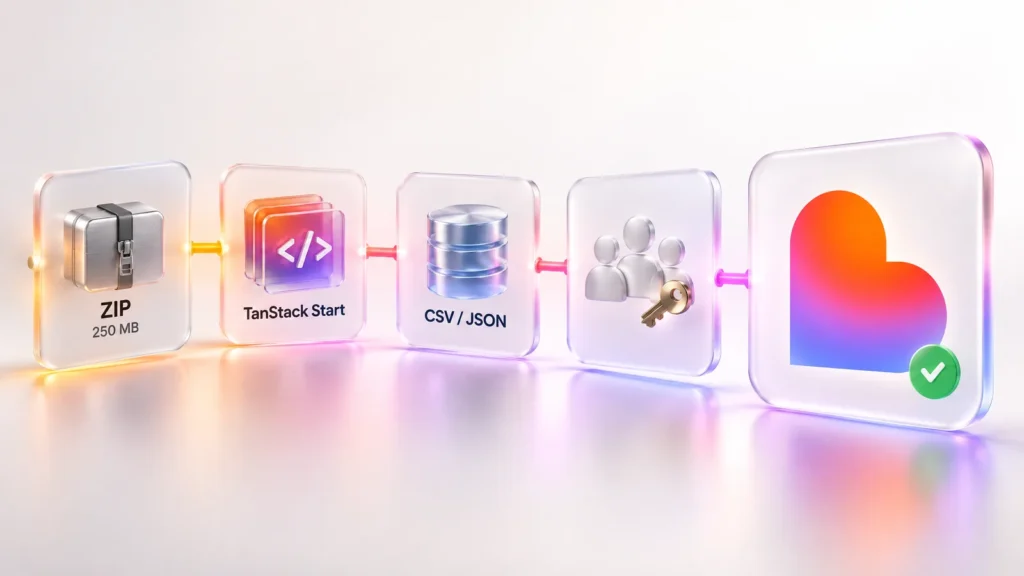
One detail trips people up: the first preview runs on an empty database. At that point Lovable reports code migration complete. It only says migration complete once data, sign-in and data access have been verified, or once you have explicitly excluded a part in the chat. Anything outstanding sits on the Still needed line.
Step by step
1. Export from the source tool
- Replit: Files tab, three-dot menu, Download as ZIP.
- Bolt: project menu, Export, then Download. Delete any .env file before uploading.
- v0: the ⋯ menu, Download ZIP.
- Base44: the ⋯ menu, Export project as ZIP. This needs Base44’s Builder plan or higher.
- Manus: send the prompt Lovable provides to the Manus project chat, then download the ZIP it prepares. Expect a few minutes.
2. Clean the ZIP
The ceiling is 250 MB. Strip .env files, node_modules, build output and folders such as .git, dist, .next and caches. Size is the obvious reason; the more important one is not shipping a forgotten API key inside the archive.
3. Start the import
Click + in the dashboard prompt box and choose Import project to Lovable. Pick your tool under App builders, or Upload code under Everything else. When the file shows Ready to import, click Start import. Lovable creates the project and runs the migration in the project chat.
4. Load your data
After the first preview, Lovable asks for data. Limits are tight: 2 MB per file, up to 10 files and 25 MB per message, CSV or JSON, optionally zipped. A single SQL dump of the whole database is not accepted, so export table by table. Lovable strips the password and token fields it recognizes, loads tables in dependency order, keeps original IDs and checks row counts. If you are not ready, reply Skip for now.
5. Cut over
Take the final data export after users stop using the old app; anything created later is lost. Then publish, connect your domain and update services that call your app, such as Stripe webhook URLs. Until you publish, the imported app is private and the original keeps running untouched.
What your users will notice
Passwords and active sessions stay behind. Every user verifies their email and sets a new password on their next sign-in, and Lovable does not notify them for you. For a SaaS side project, a membership site or a booking app, a short email before cutover saves a wave of support tickets: their data, roles and memberships are intact, they just need a new password.
The free import and credit rules
Lovable’s launch offer covers one free import per account and per workspace, shared between project and website imports. The offer page gives no end date. Three rules matter:
- The free import counts as used as soon as Lovable creates the project, even if the import fails or you delete the project afterwards.
- It is free only until a working preview. Every later message, including data uploads and answers to Lovable’s questions, uses standard build credits.
- You need available workspace credits to start any import. Running the database and users on Lovable also counts as Cloud usage.
For scale, Lovable’s own examples price making a button gray at 0.50 credits, adding authentication at 1.20 and building a landing page with images at 2.00. The Free plan grants 5 credits a day, capped at 30 a month. Its plans page converts credits at $0.25 each on Pro and $0.50 on Business. Since loading and verifying data can take several rounds, migrating an app with real users on the Free plan will be a stretch; budget for a paid plan or a top-up before you start.
If you want a paid Lovable plan, here is the option in our store; its contents and term are exactly as listed on the product page.
After the move: Memory and Dreaming
A day after imports arrived, on October 30, Lovable added Memory. Project memory is shared with everyone who can edit the project and stores business facts (prices, hours, words to avoid), design decisions and approaches you ruled out. Technical decisions are written as short rules to an AGENTS.md file at the project root. In practice, conventions you set once, such as currency formatting or the interface language, survive into later chats. You can review and correct them under More → Settings → Memory, or switch memory off.
Dreaming, added on November 4 for paid plans, tidies those notes in the background by checking them against your code. It uses no credits and never edits app code. It does not run in projects with Git sync, in workspaces with EU inference enabled, or in projects whose memory is set to Nothing.
Should you migrate?
If the code is in reasonable shape, the schema is clean and you want to keep iterating in Lovable’s chat workflow, the importer saves real time. If the app depends heavily on uploaded files, on a stack-specific backend, or on users who will resist a password reset, test with a throwaway copy first. The free import is a one-shot, so spend it on the project that matters, after you have cleaned the ZIP.
Frequently asked questions
Which tools can I import to Lovable from?
Lovable has guided export steps for Replit, Bolt, Base44, v0 and Manus. Code from any other tool, including a GitHub repository downloaded as a ZIP, can be uploaded through Upload code, up to 250 MB. Public websites are handled by a separate website import that takes a URL.
Is importing a project to Lovable free?
One import per account and per workspace is free until a working preview, shared between project and website imports. Later messages, including data uploads, use standard credits. The free import is counted as used once the project is created, even if the import fails (checked November 12, 2026).
Can my users sign in with their old passwords?
No. Passwords and active sessions stay in the old tool. Each user gets a new Lovable account linked to their original user ID, so their records, roles and memberships remain, but they verify their email and set a new password on their next sign-in. Lovable does not notify them, so you should.
Can I upload my whole database as one SQL file?
No. Lovable does not accept a single SQL dump. Export each table as CSV or JSON. Files can be up to 2 MB each, with at most 10 files and 25 MB per message.
Does importing change my existing app or site?
No. The original keeps running unchanged. The Lovable project stays private until you publish it, and visitors only reach it once you point your domain at it.
Can I import someone else's website?
Only if you own it or have the owner's permission; Lovable asks you to confirm this in the chat for each site. The import is a one-time copy of what visitors see, without logins, databases or form backends.
Sources
- Changelog — Lovable, 12 November 2026
- Import a project from Replit, Bolt, v0, or another tool — Lovable, 12 November 2026
- Import a website — Lovable, 12 November 2026
- Import your website or project to Lovable — Lovable, 12 November 2026
- Memory — Lovable, 12 November 2026
- Plans and credits — Lovable, 12 November 2026
- Lovable now imports existing websites and projects — Creators Toolbox, 12 November 2026