

AI Tools Blog
Cursor Live Apps: What It Builds, What It Costs and Who It Fits


Cursor Live Apps, released on November 5, 2026, lets a cloud agent build a web app, add a Postgres database and sign-in, host it, and hand you a shareable link. It needs a paid plan with cloud agents, starting at $30 a month, and Cursor has not published what hosting costs or how far it scales. That makes it a strong fit for internal tools today and a harder call for anything customer-facing.
- Apps run through cloud agents only, not locally, and you have to ask the agent for an app explicitly.
- Cloud agents come with Premium ($30/month) and above, Teams, Enterprise and legacy paid plans. Free and Plus are excluded.
- Neither the changelog nor the docs list hosting fees, traffic limits or database quotas.
- Four fixed checks and an AI review run before publishing, and nothing goes live until you publish it yourself.
- Private and team apps sit behind Cursor sign-in, which suits colleagues far better than customers.
The gap Cursor is trying to close
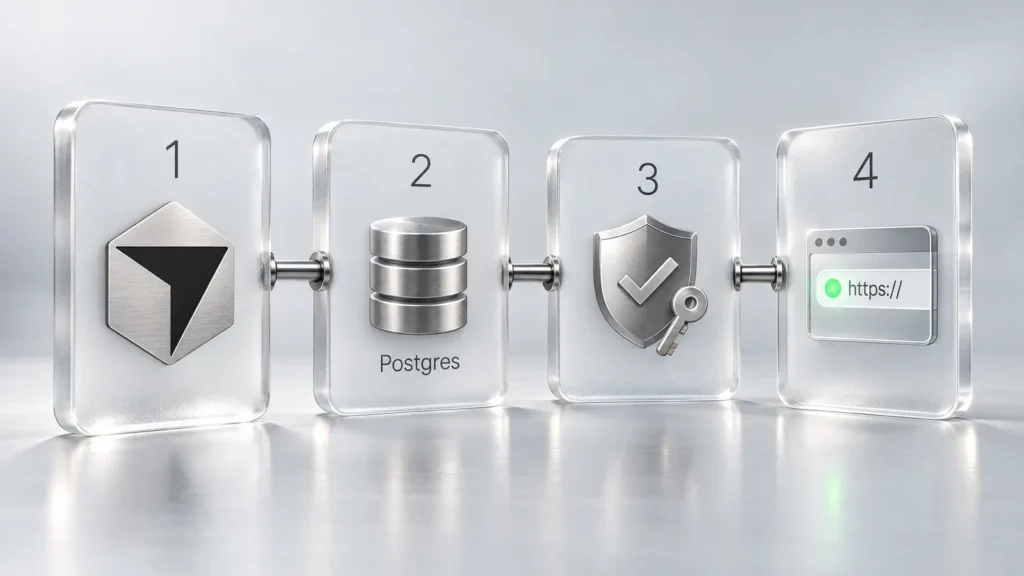
Coding agents made writing an app cheap, but the finished code often stops at localhost. Someone still has to find a host, stand up a database, wire in login and work out who may open the thing. Cursor’s November 5 release packages those chores into the cloud agent: it scaffolds the web app, creates Postgres if the app needs it, puts authentication behind Cursor SSO, provisions hosting, and asks for any secrets required to reach systems such as a data warehouse.
The company’s examples are revealing. Its own staff in sales, operations, legal, finance and engineering have built event registration and desk seating tools, pipeline dashboards, onboarding programs, multimedia customer presentations and engineering service portals. Most of those are the small internal apps that rarely earn a place on an engineering roadmap, and that is the clearest way to think about the feature.
How publishing works
- Start a cloud agent from cursor.com/agents, the iOS app, or the Cloud option under the agent input in Cursor Desktop. You will be asked to set a spend limit the first time you use cloud agents.
- Ask explicitly for an app. Starting from scratch creates a new repository on Cursor Origin; you can also point the agent at an existing GitHub repository. GitLab and other providers are listed as coming soon.
- Supply secrets when prompted. Cursor’s docs say the agent never sees their values.
- Preview the app in the tray, choose its URL (you can change it later) and publish.
- If the checks pass, you get a live link. If they fail, you get a list of issues to fix before trying again.
What it costs, and what nobody can tell you yet
The plan requirement is clear. Here is the relevant part of Cursor’s pricing page, checked on November 6, 2026. Prices exclude taxes and fees.
| Plan | Monthly price | Usage | Cloud agents and apps |
|---|---|---|---|
| Free | $0 | Limited | No |
| Plus | $8 | Basic shared pool, Grok models only | No |
| Premium | $30 | 4x Plus | Yes |
| Super | $100 | 15x Plus | Yes |
| Ultra | $200 | 50x Plus | Yes |
| Teams | From $30 per user | 4-50x Plus, pooled | Yes |
Legacy paid plans keep cloud agent access, according to the docs, and Enterprise is custom-priced. The build itself draws on your plan usage at the selected model’s rate, while third-party models are billed separately at API list price.
The running cost is the open question. We found no published hosting fee, request limit or database quota in the changelog or the Apps documentation. Budget for the build, keep the spend limit low on a first project, and treat long-term hosting costs as unknown until Cursor says otherwise.
If you are looking at access through a bundle, our store lists Grok Premium + Cursor – 1 Month; see the product card for details, and confirm that the Cloud option appears in your agent menu before planning around this feature.
 Grok Premium + Cursor – 1 MonthIn stock$11.50
Who can open your app
There are three visibility levels: people you invite, your whole team, and public. The first two require Cursor sign-in. The public setting opens the app to anyone with the link and works on individual plans. On Teams and Enterprise it is off by default, and an admin can turn it on from the Apps dashboard. The changelog mentions public sharing only for individual plans, so we are following the more detailed docs here.
Automation gets its own route. A Cursor API key sent in the x-cursor-app-token header on every request lets scripts, CI jobs and Grok Bot reach private apps. Query parameters and cookies do not work for this. Personal keys open what their owner can open, and team keys open only the team apps they were granted.
What the security review covers
Four rules run before every publish, even with AI review turned off: block secrets written into app files, block credential files such as private keys, keep .env files out of the published output, and strip source maps. An AI review then scans the files and blocks serious issues. Team admins can add instructions to that review and approve blocked publishes, except where the block involves malicious code, hardcoded secrets or exposed credentials.
Read that list carefully and you will notice its focus: leaked credentials. Broken authorization, such as one user seeing another’s records, would be down to the AI review, and we found no published figures on how often it catches such flaws. Test access rules yourself.
Two more items belong in any risk assessment. Cursor’s security page says cloud agents run terminal commands without per-command approval, have internet access by default, and could be exposed to prompt injection, so tighten network settings if the agent touches sensitive repositories. And the Apps docs state that hosting is provided as is, sits outside Cursor’s services, and that apps or subdomains can be removed for business, financial or legal reasons, among others. That is reasonable for a dashboard and worth weighing for a process your company depends on.
Cursor vs. Lovable vs. Replit
All three can take a described app to a live URL. The differences show up in access, cost clarity and who the tool assumes you are. Figures below were checked on official pages on November 6, 2026.
| Cursor | Lovable | Replit | |
|---|---|---|---|
| Entry point | Premium, $30/month | Free tier can publish; Pro from $25/month (100 credits) | Starter: 1 app that expires after 30 days and can be republished; Core $20/month |
| Hosting cost | Not published | Publishing is free; running apps use Run credits | Metered: Autoscale $2 base plus usage, Reserved VM from $15, Static hosting free with $0.05/GB transfer |
| Private access | Cursor sign-in | Lovable sign-in; 10 invited people per project on Free and Pro | Password, workspace or invite |
| Own domain | Not covered in the docs | Paid plan required | Supported |
A simple way to decide
- Pick Cursor if your team already works there and the app is internal. Login is solved, the code lives in a repository, and admins can see and unpublish everything.
- Pick Lovable if a non-developer wants a public site or product on their own domain, with a written cost model.
- Pick Replit if you want to choose the deployment type and machine size and estimate the bill in advance.
For customer-facing products, a dependency on Cursor sign-in is the sticking point: you cannot expect customers to hold Cursor accounts. Alpha Signal’s summary makes the same point about projects that need a different identity system or custom networking, which still call for a conventional pipeline.
Before you move real data
Portability is partly answered. Origin repositories support standard git clone, push and pull, so your code stays yours, though Origin is still in early beta. The docs do not explain how to export the managed database or move hosting elsewhere. They also do not state where apps and their data are hosted, beyond cloud agents running on Cursor’s AWS infrastructure, so if you handle regulated data, get that answer from Cursor first.
A sensible first project is something low-stakes with no personal data. A desk seating tool, like the one Cursor mentions, is about the right size.
Frequently asked questions
When did Cursor Live Apps launch?
Cursor announced it in a changelog entry dated November 5, 2026. It is available on all paid plans with cloud agents enabled, and you may need to update Cursor first.
Which Cursor plan do I need to build apps?
A plan that includes cloud agents: Premium ($30/month), Super, Ultra, Teams, Enterprise or a legacy paid plan. Free and Plus do not include them. Prices were checked on November 6, 2026 and exclude taxes and fees.
Does Cursor charge extra for hosting?
Cursor has not said. The changelog and documentation list no hosting fees, quotas or traffic limits. What is documented is that cloud agent work draws on plan usage at the selected model's rate and that you are asked to set a spend limit.
Can customers use an app I publish with Cursor?
Public apps can be opened by anyone with the link, and that option is on for individual plans and available to Teams or Enterprise if an admin enables it. Private and team apps need Cursor sign-in. The docs do not describe a ready-made login system for your own customers.
Can I connect a GitLab repository?
Not for apps yet. The changelog lists Cursor Origin and GitHub today, with GitLab and other git providers coming soon.
Does passing the security checks mean an app is safe?
No. The fixed rules concentrate on leaked secrets and credential files, and the AI review looks for serious issues without published detection rates. You still need to test authorization and data access yourself.
Sources
- Build Live Apps in Cursor — Cursor, 6 November 2026
- Apps — Cursor Docs — Cursor, 6 November 2026
- Cloud Agents — Cursor Docs — Cursor, 6 November 2026
- Cloud Agent security and network — Cursor Docs — Cursor, 6 November 2026
- Cursor Origin — Cursor Docs — Cursor, 6 November 2026
- Cursor Pricing — Cursor, 6 November 2026
- Publish your app — Lovable Docs — Lovable, 6 November 2026
- Subscription plans — Lovable Docs — Lovable, 6 November 2026
- Publishing — Replit Docs — Replit, 6 November 2026
- Deployment pricing — Replit Docs — Replit, 6 November 2026
- Replit Pricing — Replit, 6 November 2026
- Cursor's Build Live Apps Turns a Text Prompt Into a Hosted Web App — Alpha Signal, 6 November 2026